• info@nccudominica.com
  • Opening Hours

    Monday - Thursday 8am - 3pm

    Friday 8am - 4pm

    NB St. Paul Branch : Thursday Closed, Saturday 9am - 1pm

Overseas Members

No matter where you are. NCCU is here to serve you.

  • Join
  • Loans
  • Transfer Funds
  • Contact Us
  • Withdraw
  • DSF Form
  • REACTIVATE/UPDATE
  • FATCA
  • CU ONLINE SIGN UP

To complete a Membership Application form Click here!

  • 1 You sign the card
  • 2 It is witnessed and signed by two persons
  • 3 You enter one or more beneficiaries
The Card is to be duly notarized and returned to us by mail with the following:
Notarized copy of
  • Passport (Identity page)
  • US passport (identity page) or Green Card if you are a US citizen or resident
  • Driver’s licence with current address or a
  • Current utility bill or bank statement with your full name and address
  • Your birth certificate and a parent’s birth certificate – if you are of Dominican parentage
  • A completed W-9 IRS Tax Form if you are a US Citizen or Resident
  • A recent salary slip/documentary record, for income exceeding $2,500 per month
Please include
  • A minimum of EC$80.00. This amount covers new member account fees of EC$25.00, the minimum $5 deposit and one Member Share at EC$50.00 (Consider purchasing more than one Share).
Note: Purchase a minimum of two (2) shares to name two or more beneficiaries to your account.

Money to open the account can be sent by bank draft, international money order or personal check. Click here to see ways to transfer funds to Dominica.

In keeping with our drive to exceed our members’ needs and expectations, NCCU provides loans to members residing overseas.

Applying for a Loan from Overseas

Simply contact NCCU by email, fax or letter with the details of your loan request and we will get back to you promptly.

Two options are provided for processing your application. You can choose to:

1. Grant Power of Attorney to someone to process the loan on your behalf, or

2. Carry out the application process by mail or courier at your cost.

If you choose Option 1, you must:

  • Arrange to have the Power of Attorney registered in Dominica at the Government Registry. To register the document you pay stamp duty of $15.00 into the Government Treasury, and buy $5.00 worth of adhesive Dominica stamps for every nine lines of text on the document.
  • Provide the person who has been granted Power of Attorney with all the details and information necessary to process the loan, including details of all your other commitments. All supporting documentation from your country of residence must be notarized.
 

If you choose Option 2, you must:

  • Notarize the completed application form before it is returned to NCCU.
Loan Categories Members residing overseas can apply for loans for all purposes. Click on the Loans Menu and select a loan type for a list of the items required for processing your loan. You will also need to provide:
  • Notarized income tax return forms for the past two (2) years.
  • A notarized letter of employment indicating employment status and salary or
  • Where practicable notarised details of income for the last three (3) months
  • Details of Current Debt (Credit Reports)
  • Security Savings of 15% of the loan amount
Additional Information
NCCU members residing overseas can transfer funds to savings and loan accounts by:
  • JN International Money Transfer
  • Bank Draft
  • International Money Order
  • Telegraphic Transfer
  • Personal Cheque (NB: Foreign cheques take up to 6 weeks to clear)
Telegraphic Transfer Send and receive funds to your accounts by telegraphic transfer through the National Bank of Dominica (NBD). Provide your bank with NBD’s SWIFT Code and its address along with your NCCU account number as follows:

NBD’S INTERNATIONAL CORRESPONDENT BANKS

CURRENCY

CORRESPONDENT BANK

SWIFT ID

BANK IDENTIFIER

US Dollar-USD Bank of America 100 West 33rd Street, 4th Floor, NYC New York, 10001 USA BOFAUS3N ABA #026009593
Caribbean Region National Bank of Dominica 64 Hillsborough Street Roseau Dominica NCDMDMDM
Canadian Dollar-CAD Bank of Nova Scotia Global Wholesale Services 44 King Street West Toronto Ontario M5H 1H1 NOSCCATT Transit #000410202
Pound Sterling & EURO Lloyds Bank Plc LOYDGB2L Sort Code # 30 96 34
Click here to fill telegraphic transfer form as per request.
SWIFT Code: NCDMDMDM National Bank of Dominica 64 Hillsborough Street Roseau Dominica
For: Credit
To: National Co-operative Credit Union Limited
Account No. 115000285
For: Further Credit to  

………………………………………………………….. (Member’s Name)

Account Number …………………………………….. (Member’s Account Number


Note: All members/depositors are required to complete a Declaration of Source of Funds (DSF) form for all deposits of $10,000 and over, or on any lesser amount as determined by the Credit Union.

  Internal directory click here!

You can reach the National Co-operative Credit Union Limited by mail, email, fax or telephone

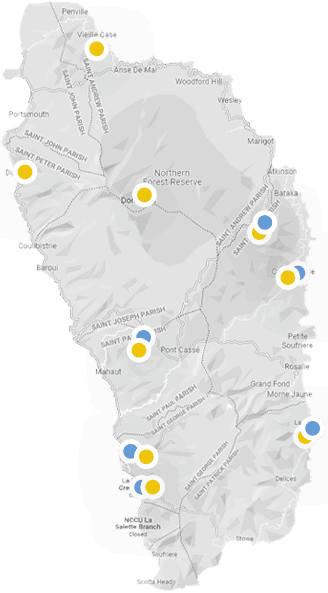
Mail: National Co-operative Credit Union Limited 31-37 Independence Street P. O. Box 175 Roseau Commonwealth of Dominica Phone: click here for Internal Directory Fax: 1 (767) 255-2109 Our General Office Hours are: Monday – Thursday: 8:00 am – 3:00 pm Fridays: 8:00 am – 5:00 pm The St. David’s and St. Paul Branches are closed on Thursdays and open on Saturdays from 9:00 am to 1:00 pm. Email addresses for our Head Office, Branches and major departments are as follows: 
Department Email Account
Chief Executive Officer ceo@nccudominica.com
Roseau Branch Manager bm_roseau@nccudominica.com
Vieille Case Branch Manager bm_vieillecase@nccudominica.com
St. Paul Branch Manager bm_stpaul@nccudominica.com
La Salette Branch Manager bm_lasalette@nccudominica.com
Administrative Officer, Castle Bruce bm_castlebruce@nccudominica.com
Administrative Officer, St. David’s bm_stdavids@nccudominica.com
Administrative Officer, La Plaine bm_laplaine@nccudominica.com
Internal Auditor internal_auditor@nccudominica.com
Legal Officer legal_officer@nccudominica.com
Processing Manager processingmanager_roseau@nccudominica.com
Collections collections@nccudominica.com
Business Development Officer business_loans@nccudominica.com
Member Services memberservices@nccudominica.com
Fixed Deposits & Chequing fixeddeposits@nccudominica.com
Cashing & Treasury tellers@nccudominica.com
Marketing Officer marketing@nccudominica.com
Systems Administrator systems_administrator@nccudominica.com
Member Services Manager memberservices_manager@nccudominica.com
Human Resource Officer humanresource@nccudominica.com
Accountant accountant@nccudominica.com
Chief Financial Officer cfo@nccudominica.com
Executive Secretary executive_secretary@nccudominica.com

Requests for withdrawals of EC$2500 and over need to be notarized. The letter can be sent by fax, or scanned and emailed, or by regular mail.

Note: All members/depositors are required to complete a Declaration of Source of Funds (DSF) form for ALL deposits of $10,000 and over, or on any lesser amount as determined by the Credit Union.

To reactivate your account you would be required to send the following documents to an NCCU Branch.
  Notarized copy of  
  • Passport (Identity page)
  • US passport (Identity page) or Green Card,  if you are a US Citizen or Resident
  • Driver’s licence with current address or a
  • Current utility bill with address
  • A letter to NCCU requesting reactivation of your account
  • W-9 IRS Tax Form if you are a US Citizen or Resident.
A recent salary slip/documentary record, for income exceeding $2,500XCD per month
  • NCCU has chosen to be FATCA (Foreign Account Tax Compliance Act) compliant. This will  allow the Credit Union to continue to perform U.S. based transactions  and will protect you, the member,  from having part of your U.S. source income withheld by U.S. banks.What is FATCA?FATCA is legislation enacted by the U.S. government in March 2010 to address tax evasion by U.S. Persons holding savings and investments in accounts outside the U.S.Who Will be Affected by FATCAThe accounts of members and depositors  with the following indicators will be flagged.  These accounts may qualify for reporting to the U.S. Internal Revenue Service (IRS).
    • U.S. Citizenship or resident status (green card holders)
    • U.S. place of birth
    • U.S. residence
    • Standing instructions to transfer funds to a U.S. account
    • U.S. care of or hold mail address
    • Power of Attorney with a U.S. address
    • U.S. telephone number
    NCCU will investigate these accounts to determine their U.S. Status and if they are to be reported. For more information please view our FATCA Brochure | Visit the US IRS Website. For quick access to FATCA related IRS forms click below: Please contact our FATCA contact person @ 767-255-2142  for further information. Notice: All IRS tax forms should be printed and returned to NCCU by  mail or in-person.

You asked for it and IT’S HERE. COnline.  It is secure and easy to use. Sign up today!

Features

  • Check account balances
  • Do transfers
  • Obtain transaction history
  • Get customised alerts
  • Open new sub accounts

at your convenience

Sign Up/Application Form

Click Here  to fill out the Application Form. Have it witnessed by two (2) persons, and NOTARISED.Then scan and send by email to your  NCCU Branch.

To access the email addresses for our BranchesClick Here

(Note: A pdf reader is needed to complete the Application Form on a mobile phone.  Consider downloading PDF Editor by Offiwiz or PDF Reader by Kdan Mobile Software Ltd.)

 

Enrollment Instructions

After you submit your application form, your Branch will provide you with a username and the following  instructions to complete the enrollment process.  

  ENROLLMENT INSTRUCTIONS

 Click Here and follow these steps. 

1. Click Enroll in Online Services.

2. Enter the username provided (when you signed up at a Branch)  along with your email address and last name.  Click Submit.

3. A security code will be emailed to you  in order to verify your email address.

4. After entering the security code, a temporary  password will be emailed to you. Enter it in the box provided.

5. After reading the disclosure, check the box indicating your agreement then click  Submit.

6. Enter a secure password then click Submit.

You can now  enjoy the convenience of the CU Online Services and    “Track Your Money, On Your Time, On Your Terms”.